Every song your band plays, in one place on your Mac. Drag tonight's set into shape, print it big enough to read from six feet away, and stop carrying the whole catalog in your head.
Any Mac on macOS 12 Monterey or newer, Apple Silicon or Intel. No Windows.
Snap a photo of an old setlist to add it to your database. Glance at the freshness meter to see how many songs you're repeating from the last time you were in town. Quickly print off a lyric book, or tech cue sheets for FOH and the lighting designer. Expedite setlist submission with your PRO. And do it all in style, with your choice of 19 distinct themes to match your mood.
Built for the person in the band who writes the setlist, files the paperwork, and hands out the charts. Bandleaders, music directors, solo acts, and anyone doing that job for more than one act at a time.
I'm Brian Buchanan. I've spent 25 years on the road as a fiddler and songwriter with Enter the Haggis and House of Hamill, and I've written thousands of setlists at venues all over the world. Sitting backstage with no table, bad lighting, and dried out markers, I've gotten sets finalized and copied out more times than I can count. I'm not a developer. I just wanted this app to exist, and nothing on the market did the job: easy to read setlists with notes, keys, and capo positions, a record of what we played and where, and the whole catalog in one place so I wasn't holding it in my head every night.
So I built Setcraft.
I've used it at dozens of my own shows, and I genuinely can't imagine touring without it now. All my songs and setlist data are right at my fingertips, and I'm so excited to share it with you.
Brian Buchanan, Enter the Haggis / House of Hamill
PLACEHOLDER: real beta tester quote goes here, in their own words.
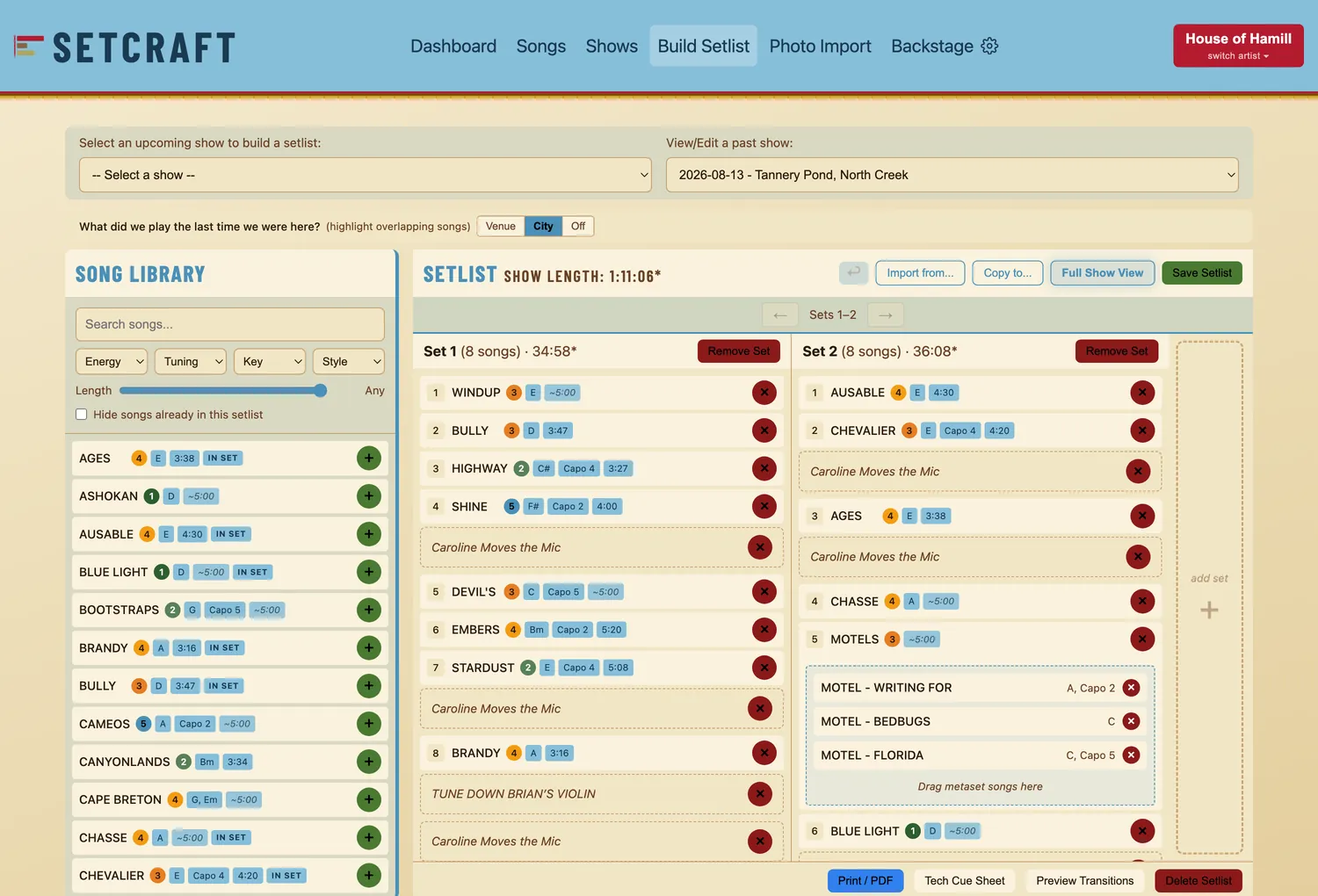
Building a set is as easy as dragging songs out of your library and pushing them around until the order feels right. Add a second, third, or fourth set with a single click. Make a mess of it and click undo to walk back fifty steps.
Between songs, leave yourself a note: drop to D for this one, talk up the new record, bring the guest out. Hover between two songs, click the +, and the note lands at that exact spot. Notes you use every set can be saved as defaults and dropped in with one click, and a note that eats stage time can carry a length that counts toward the set.
Pick the show and Setcraft pulls up the last set you played in that room or city. Those songs light up in your library while you build, so a repeat shows itself before you commit to it.
A freshness meter reads how much of tonight is new against that history. Switch the highlight between Venue, City, and Off as you go.
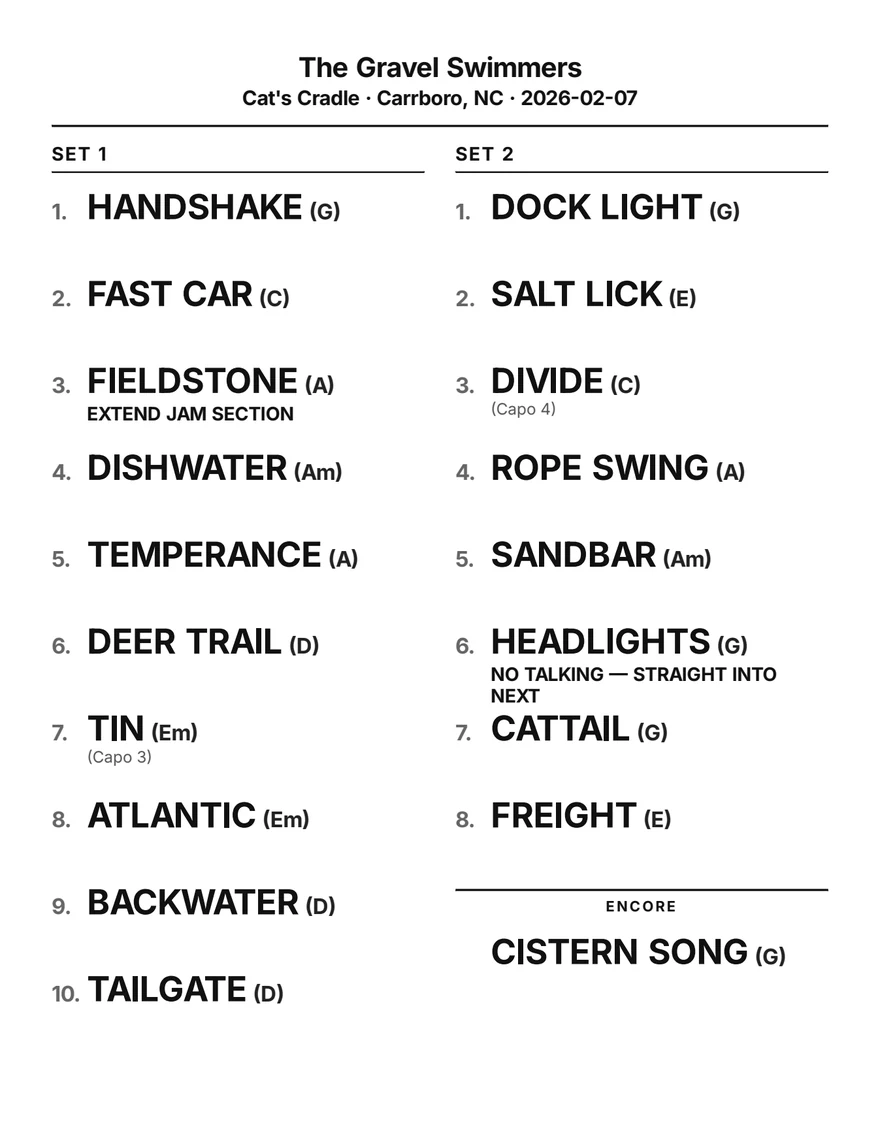
Setlists come out in bold capitals, two columns, sized to fill the page. A normal set lands on one sheet; a long one runs onto a second. Print through the Mac dialog or save a PDF.
The same library can be exported as a lyric book, a chart book of whatever charts you've uploaded, a single-song lyric sheet, an FOH/lighting cue sheet, and a PRO report to expedite your live show royalty reports. Toggle key, capo, and per-song notes, then save those choices as your default.
Roll each song's Front of House and lighting notes into a tech cue sheet your sound and lighting crew can work from, with per-show overrides and between-song transition cues. And when it's time to report a show, generate a PRO report from your setlist to expedite your royalty submission to ASCAP, BMI, SOCAN, and the rest.
Tech cue sheets and PRO reports are paid features. They are included in Pro and Road Warrior, and watermarked in the free trial.
Run more than one band from one copy of Setcraft. Each artist profile has its own songs, shows, setlists, theme, and Bandsintown account. Need more? Upgrade to a Road Warrior license for unlimited artist profiles.
Connect your Bandsintown Artist account once, and Setcraft imports your shows for you: upcoming dates, and your past show history too, so your venue records start full instead of empty. Shows you already entered by hand are matched by date and venue rather than duplicated. Each artist profile syncs independently, and you can always create a show manually in seconds.
Export one backup file with your whole library and charts, then import it on another Mac. Restoring a backup is always free. Audio files you attach to songs stay on the Mac they were added to, so re-attach those after a move.
Send any setlist, lyric book, chart, or cue sheet to a bandmate's Mac or iPhone with AirDrop, straight from the share button.
Choose from 19 themes to change how the whole app looks. Each Artist Profile remembers its saved theme, so you can set the mood for every band.
Turn each song's front-of-house and lighting notes into a clean tech cue sheet your sound and lighting crew can follow, with per-show notes and between-song cues.
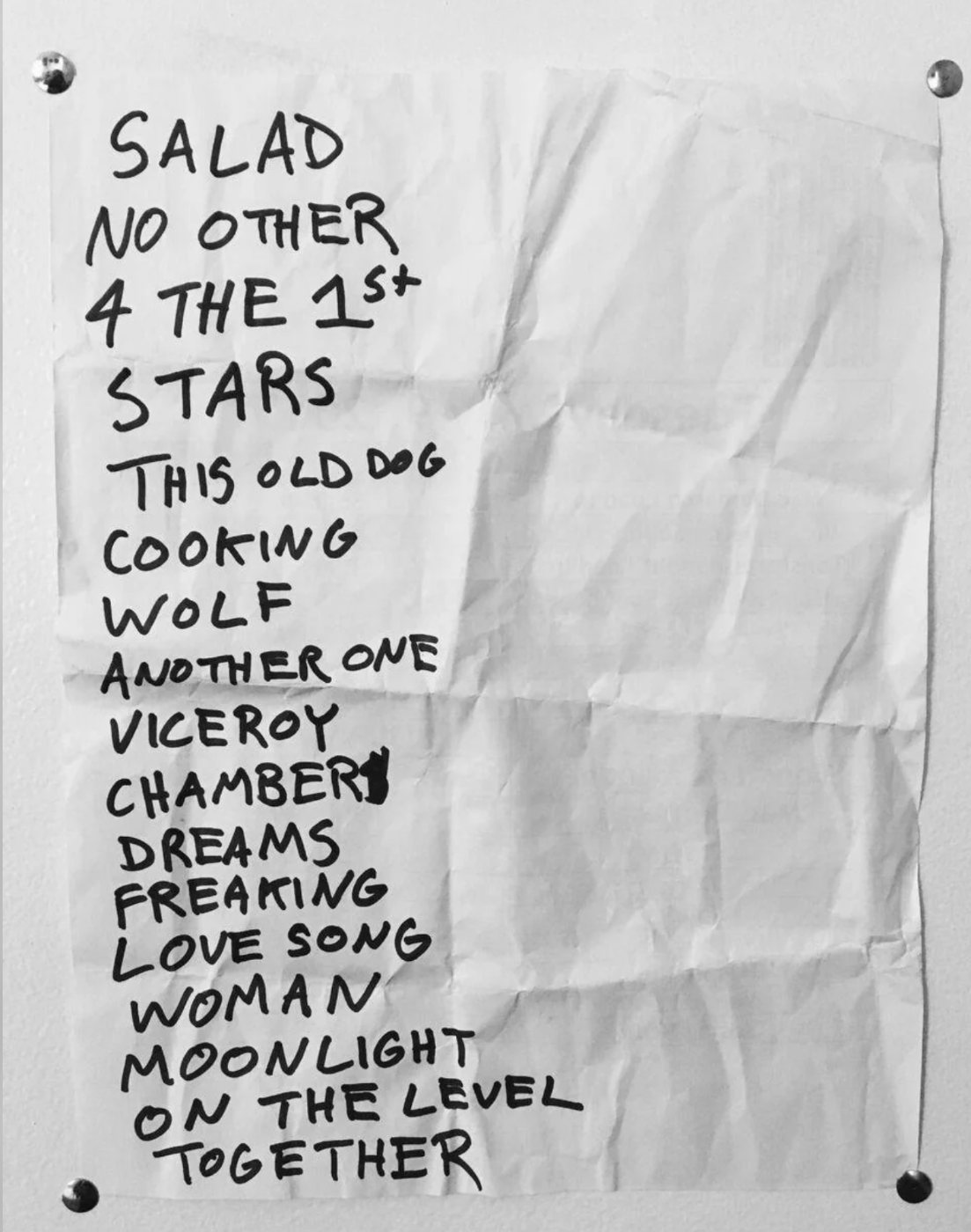
Got an ancient setlist you'd like to add to your database? Take a photo of a handwritten or printed set and upload it to the app. Setcraft reads the titles, matches each one against your library with a confidence score and a few alternates, and you confirm the calls to build that show's set.
This is the one feature that requires an internet connection (and a paid license), because the photo gets read on our server. You get twenty uploads per month.
Add details for your shows to create your venue and city history. Setcraft will track the songs you play in each venue and city, and help you keep your sets fresh when you come back.
Import Shows from Bandsintown (paid feature). Connect your account once with your artist name and API key, and Setcraft pulls in the upcoming dates you haven't entered yet. Tick one box and it brings in your past shows as well, so years of gig history land in an afternoon and you can back-enter what you played. If you've got multiple artist profiles, you can enter their Bandsintown keys and sync all your calendars at once.
19 themes restyle the whole app and the sheets it prints, and each artist profile remembers its own look. Five of the themes are wired into this page; click a button on the right to preview!
This is one of Setcraft's 19 themes. Try a few.
Pick the one that fits how you work. Both are lifetime licenses with every V1 update included. No subscription, ever.
Setcraft is a Mac app, and the download is free — buying doesn't download anything. Get it from the download page before or after you buy.
Checkout emails you a license key. That email is the whole delivery: there's no account to create and nothing to log in to.
In Setcraft, open Backstage › Account & License and paste the key. Every paid feature switches on.
For the artist running one act.
Checkout runs through Lemon Squeezy, our merchant of record. They take payment and email your license key; you enter it in the app under Backstage › Account & License. The app itself is a separate free download — get it here if you haven't already.
For anyone running more than one act. Multi-band players, music directors, agents, and the person handling setlists for the whole roster.
Everything in Pro, plus
Already on Pro? Upgrade to Road Warrior from inside the app and pay only the difference, about $15. New here? The app is a separate free download — get it here.
For comparison, the leading setlist subscriptions run $30 to $60 every year. Setcraft is one payment, and the license never expires.
Download Setcraft and run the full app for a month. No credit card. One artist profile, unlimited songs, Bandsintown sync, and five photo imports. Printouts and exports carry a SETCRAFT TRIAL watermark; buying a license clears it. Build real sets, take it to a real gig, and decide once you know.
After 30 days, if you haven't bought a license, Setcraft drops to Free. Everything you already built stays. Your full library, every show, every setlist, all of it readable, printable, and exportable. You never lose your data.
No card and no subscription. Leave your email, we send you the download links, and you buy later from inside the app when you're ready.
Any Mac on macOS 12 Monterey or newer. There are two downloads, one for Apple Silicon (M1 and later) and one for Intel, and the download page picks the right one for you. There's no Windows or web version for end users.
The full app for 30 days, no credit card. One artist profile, unlimited songs, Bandsintown sync, and five photo imports a month. Printouts and exports carry a SETCRAFT TRIAL watermark until you buy a license. Build real sets, take it to a real gig, and decide when you know.
If you haven't bought a license, Setcraft drops to Free. Everything you already built stays put. Your full library, every show, and every setlist remain readable, printable, and exportable. You never lose your data. Buy a license any time to switch the paid features back on.
Free keeps one artist profile and everything in it, all 19 themes, full setlist building, and print and PDF export of every set you own. Free limits: exports carry a SETCRAFT FREE watermark across the page, photo import, Bandsintown sync, tech cue sheets, and PRO reports switch off, and you can't add new songs once your library is at or over 15. The songs already in your library stay fully usable.
Pro is $19.99 and covers one artist profile with unlimited songs, watermark-free exports, photo import, and Bandsintown sync. Road Warrior is $34.99 and adds unlimited artist profiles, each with its own library, theme, and Bandsintown key. Front one act, buy Pro. Front several, buy Road Warrior.
No. Upgrade from inside the app and pay only the difference, around $15. Your library and setlists carry straight over.
Photo setlist import and Bandsintown show sync run on the trial and on any paid tier, and switch off on Free. So do tech cue sheets and PRO reports, which build on top of your sets. Photo import gives you five a month on the trial and twenty a month once you buy. Future imports we add, like library and Spotify import, follow the same rule.
On your Mac. Your songs, shows, and setlists are kept on your own computer, never on our servers. The one exception is a setlist photo you choose to import, which is covered in the Privacy Policy. To keep your data safe, Setcraft saves automatic backups on your Mac, including one just before any action that could delete something. You can restore a backup for free on any computer, even a new one. Later versions may add optional cloud backup, and we will never look at your data without your clear permission.
Yes. Pro and Road Warrior let you export one backup file that holds your whole library, charts and all. Copy that file to another computer, open Setcraft there, and import it. Importing is always free, even when you first set up Setcraft on a new computer, so your library can always move with you. During the free trial and on the Free version, your data is still kept safe by the automatic backups on your Mac. Only the export, the file that carries everything to another computer, needs a paid license.
One payment for a lifetime license: $19.99 for Pro or $34.99 for Road Warrior. We email you a license key after checkout; you enter it in the app to activate the paid features. No subscription, ever.
The app and the license are two separate things: the app is always a free download from the download page, and buying gets you a license key that unlocks the paid features inside it. Your confirmation email carries the key, not the app. Download Setcraft, open Backstage › Account & License, and enter the key from that email. There's no Lemon Squeezy account to log into — the key in the email is everything you need.
Setcraft can update itself, but it's strictly opt-in: it won't check for or install anything unless you turn that on. When you do, it updates quietly in the background. You can also check any time from the Help menu. Either way, no App Store and no re-downloading.
Not quite yet. Setcraft V1 is a Mac desktop app. A lightweight iPad Reader for viewing your setlists/lyrics/charts on stage is on the roadmap, with no date yet. Buying the Mac app doesn't include it, and V1 doesn't sync between devices. Even though Setcraft isn't yet available on iOS, in V1 you can export any of your setlists, charts, or lyric books as PDFs which are formatted to read on an iPad screen.